> ## Documentation Index
> Fetch the complete documentation index at: https://docs-dev-chore-gt-workflow.mintlify.site/llms.txt
> Use this file to discover all available pages before exploring further.
> Learn how you can enhance security and mitigate risks of application impersonation with HTTPS-based callbacks.
# Migrate to Non-Verifiable Callback URI End-User Confirmation
Auth0 recommends all native applications using the [Authorization Code Flow](/docs/get-started/authentication-and-authorization-flow/authorization-code-flow-with-pkce) transition to HTTPS-based callbacks using [Android App Links](https://developer.android.com/training/app-links) and [Apple Universal Links](https://developer.apple.com/documentation/xcode/allowing-apps-and-websites-to-link-to-your-content). This enhances security and mitigates risk of application impersonation and phishing attacks.
To understand how this prevents attacks, review the [Measures Against Application Impersonation](/docs/secure/security-guidance/measures-against-app-impersonation#prompt-customization).
Tenants created before October 15, 2025 maintain the previous behavior as the default until April 28, 2026. After the October cutoff date, newly created tenants may default to displaying the new login confirmation prompt with some exceptions due to each environment's deployment schedule.
Tenants that explicitly opt out will bypass this prompt indefinitely. This remains true even after April 28, 2026, when the service adopts the confirmation prompt as the default behavior and removes the "Unconfirmed Login with Non-Verifiable Callback URI Redirects" migration toggle.
## How are you affected?
For client applications that already specify or plan to specify a custom URI scheme or loopback URI callback, end-users may be required to explicitly confirm the login by interacting with the new login confirmation prompt. Your end-users may perceive this change as a declining user experience.
Additionally, authentication requests including `prompt=none` will be rejected when applications use non-verifiable callback URIs and are configured to use the new login confirmation prompt.
## Migration tasks
**Auth0 strongly recommends transitioning to HTTPS-based callbacks** using Android App Links and Apple Universal Links whenever possible for all native applications using the Authorization Code Flow.
Furthermore, in tenants where the default behavior changes after April 28, 2026, you should explicitly select the behavior you require for authentication requests using custom URI schemes or loopback URI callbacks ahead of the system default change.
### Review whether your applications are using Non-Verifiable Callback URIs
In tenants for which the Unconfirmed Login with Non-Verifiable Callback URI Redirects migration toggle is available and in an enabled state, authentication requests specifying a custom URI scheme or loopback URI **will generate a deprecation notice tenant log** unless you have explicitly set the following option at the application or tenant level:
`skip_non_verifiable_callback_uri_confirmation_prompt`
These tenant logs contain the client identifier of the application performing the request. You can monitor these tenant logs through the Auth0 Dashboard using the following query:
```bash theme={null}
type:depnotetype:depnote AND description:Unconfirmed\ Login\ with\ Non-Verifiable\ Callback\ URI\ Redirects*
```
### Opt in to new login confirmation prompt
To opt-in to the new login confirmation prompt ahead of time and enhance security for authentication flows using custom URI schemes or loopback URIs, complete the following steps through your Auth0 Dashboard:
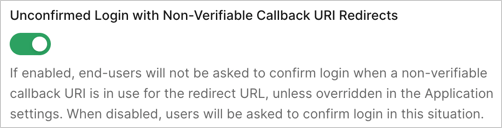
1. Navigate to [**Auth0 Dashboard > Tenant Settings > Advanced**](https://manage.auth0.com/#/tenant/advanced).
2. In the **Migrations** section, turn off the **Unconfirmed Login with Non-Verifiable Callback URI Redirects** toggle.
 ### Opt out of new login confirmation prompt
If, after evaluating the security considerations, you decide against using the new login confirmation prompt, you can configure specific applications or the whole tenant to opt out of the new behavior. You can do so through your Auth0 Dashboard.
The application-level setting takes precedence over the tenant-level setting. Ensure you configure application-specific settings before changing the tenant-level setting to avoid unintended behavior changes. For example, you may want to skip the Non-Verifiable Callback URI End-User Confirmation for some specific applications while, by default, showing it for other applications, or vice versa.
To opt out for specific applications:
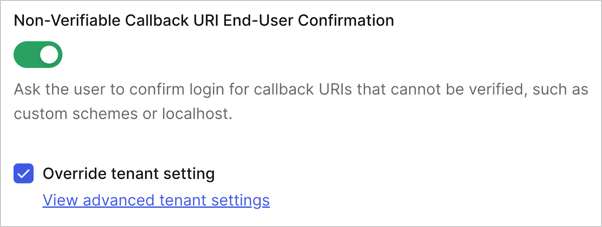
1. Navigate to [Auth0 Dashboard > Applications > Settings > Advanced Settings > OAuth](https://manage.auth0.com/applications/settings).
2. Locate and disable the **Non-Verifiable Callback URI End-User Confirmation** toggle and select **Save**. You may need to select the **Override the tenant setting** option to permanently allow managing this configuration.
### Opt out of new login confirmation prompt
If, after evaluating the security considerations, you decide against using the new login confirmation prompt, you can configure specific applications or the whole tenant to opt out of the new behavior. You can do so through your Auth0 Dashboard.
The application-level setting takes precedence over the tenant-level setting. Ensure you configure application-specific settings before changing the tenant-level setting to avoid unintended behavior changes. For example, you may want to skip the Non-Verifiable Callback URI End-User Confirmation for some specific applications while, by default, showing it for other applications, or vice versa.
To opt out for specific applications:
1. Navigate to [Auth0 Dashboard > Applications > Settings > Advanced Settings > OAuth](https://manage.auth0.com/applications/settings).
2. Locate and disable the **Non-Verifiable Callback URI End-User Confirmation** toggle and select **Save**. You may need to select the **Override the tenant setting** option to permanently allow managing this configuration.
 To opt out for the whole tenant:
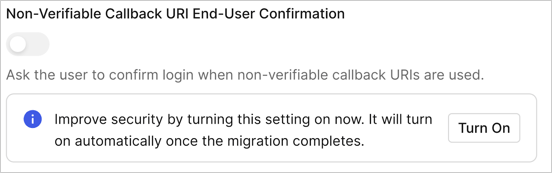
1. Navigate to [Auth0 Dashboard > Tenant Settings > Advanced](https://manage.auth0.com/tenant/advanced).
2. Locate and disable the **Non-Verifiable Callback URI End-User Confirmation** toggle within the **Login and Logout** section and select **Save**. You may need to select **Turn on** to allow permanently managing this configuration.
To opt out for the whole tenant:
1. Navigate to [Auth0 Dashboard > Tenant Settings > Advanced](https://manage.auth0.com/tenant/advanced).
2. Locate and disable the **Non-Verifiable Callback URI End-User Confirmation** toggle within the **Login and Logout** section and select **Save**. You may need to select **Turn on** to allow permanently managing this configuration.
 You can also configure the required tenant behavior via Auth0 Management API. In particular, you can perform the configuration at two levels:
* **Tenant-Level Configuration**: You can manage the confirmation prompt behavior by setting the `skip_non_verifiable_callback_uri_confirmation_prompt` property via the [Update Tenant Settings](https://auth0.com/docs/api/management/v2#!/Tenants/patch_settings) endpoint.
* **Application-Level Configuration**: To override the tenant-level setting for specific applications, set the same `skip_non_verifiable_callback_uri_confirmation_prompt` property via the [Update Client](https://auth0.com/docs/api/management/v2#!/Clients/patch_clients_by_id) endpoint.
For additional information and guidance on configuring your applications, read [Measures Against Application Impersonation](/docs/secure/security-guidance/measures-against-app-impersonation).
You can also configure the required tenant behavior via Auth0 Management API. In particular, you can perform the configuration at two levels:
* **Tenant-Level Configuration**: You can manage the confirmation prompt behavior by setting the `skip_non_verifiable_callback_uri_confirmation_prompt` property via the [Update Tenant Settings](https://auth0.com/docs/api/management/v2#!/Tenants/patch_settings) endpoint.
* **Application-Level Configuration**: To override the tenant-level setting for specific applications, set the same `skip_non_verifiable_callback_uri_confirmation_prompt` property via the [Update Client](https://auth0.com/docs/api/management/v2#!/Clients/patch_clients_by_id) endpoint.
For additional information and guidance on configuring your applications, read [Measures Against Application Impersonation](/docs/secure/security-guidance/measures-against-app-impersonation).