> ## Documentation Index
> Fetch the complete documentation index at: https://docs-dev-chore-gt-workflow.mintlify.site/llms.txt
> Use this file to discover all available pages before exploring further.

> Learn how to configure an update policy form using Forms for Actions for users to review and accept new terms of service or consent updates.

# Use Cases: Configure an update policy form using Forms

<Card title="Before you start">
  1. Create a [Machine-to-Machine Application](/docs/get-started/auth0-overview/create-applications/machine-to-machine-apps) with the following scopes enabled:

  * `read:users`
  * `update:users`
  * `create:users`
  * `read:users_app_metadata`
  * `update:users_app_metadata`
  * `create:users_app_metadata`

  2. Add a [Vault connection](/docs/customize/forms/vault) using the M2M application credentials.
</Card>

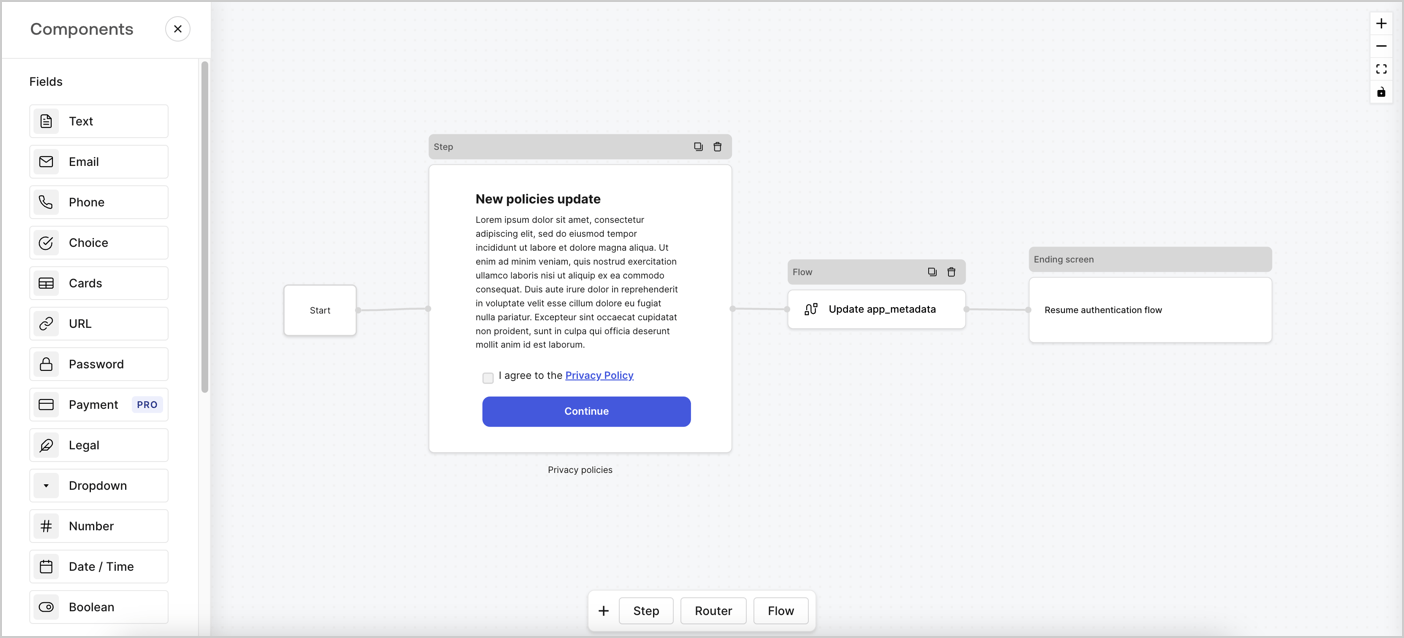
Forms for Actions allows you to create custom privacy policies flows and store the consent under the `app_metadata` object.
<Frame>
  <img src="https://mintcdn.com/docs-dev-chore-gt-workflow/60TwJfqbbFwT_MMp/docs/images/cdy7uua7fh8z/6i68dMvHDTijfRmSgN1x8Q/ad900e7d4c0fb34645921435472b8684/privavy-policy-form.png?fit=max&auto=format&n=60TwJfqbbFwT_MMp&q=85&s=6d525a80a6b85df877d0ab3994a6f799" alt="Dashboard > Actions > Forms > Privacy policy use case" data-og-width="1404" width="1404" data-og-height="638" height="638" data-path="docs/images/cdy7uua7fh8z/6i68dMvHDTijfRmSgN1x8Q/ad900e7d4c0fb34645921435472b8684/privavy-policy-form.png" data-optimize="true" data-opv="3" srcset="https://mintcdn.com/docs-dev-chore-gt-workflow/60TwJfqbbFwT_MMp/docs/images/cdy7uua7fh8z/6i68dMvHDTijfRmSgN1x8Q/ad900e7d4c0fb34645921435472b8684/privavy-policy-form.png?w=280&fit=max&auto=format&n=60TwJfqbbFwT_MMp&q=85&s=5f0a661c12904ef921aaa1fe38751dae 280w, https://mintcdn.com/docs-dev-chore-gt-workflow/60TwJfqbbFwT_MMp/docs/images/cdy7uua7fh8z/6i68dMvHDTijfRmSgN1x8Q/ad900e7d4c0fb34645921435472b8684/privavy-policy-form.png?w=560&fit=max&auto=format&n=60TwJfqbbFwT_MMp&q=85&s=942ce86d96860e958c8495b79903860f 560w, https://mintcdn.com/docs-dev-chore-gt-workflow/60TwJfqbbFwT_MMp/docs/images/cdy7uua7fh8z/6i68dMvHDTijfRmSgN1x8Q/ad900e7d4c0fb34645921435472b8684/privavy-policy-form.png?w=840&fit=max&auto=format&n=60TwJfqbbFwT_MMp&q=85&s=d3c6210bd22535328e0f4b130a575a8c 840w, https://mintcdn.com/docs-dev-chore-gt-workflow/60TwJfqbbFwT_MMp/docs/images/cdy7uua7fh8z/6i68dMvHDTijfRmSgN1x8Q/ad900e7d4c0fb34645921435472b8684/privavy-policy-form.png?w=1100&fit=max&auto=format&n=60TwJfqbbFwT_MMp&q=85&s=8328ecdde5015eb1096a19686a52cd91 1100w, https://mintcdn.com/docs-dev-chore-gt-workflow/60TwJfqbbFwT_MMp/docs/images/cdy7uua7fh8z/6i68dMvHDTijfRmSgN1x8Q/ad900e7d4c0fb34645921435472b8684/privavy-policy-form.png?w=1650&fit=max&auto=format&n=60TwJfqbbFwT_MMp&q=85&s=a505edb0ea2048680c06f30dd700603f 1650w, https://mintcdn.com/docs-dev-chore-gt-workflow/60TwJfqbbFwT_MMp/docs/images/cdy7uua7fh8z/6i68dMvHDTijfRmSgN1x8Q/ad900e7d4c0fb34645921435472b8684/privavy-policy-form.png?w=2500&fit=max&auto=format&n=60TwJfqbbFwT_MMp&q=85&s=1be1d334b257e8cfc85ae85dad660115 2500w" />
</Frame>

The sections below outline how you can create an Update Policy form using nodes and flows, along with steps for adding your form to a [Post Login](/docs/customize/actions/explore-triggers/signup-and-login-triggers/login-trigger) Action.

## Create a form from scratch

Follow these steps to create a form to gather information:

1. Open the Form editor by selecting **Auth0 Dashboard > Actions > Forms.**
2. Select **Create Form** > **Start from scratch**.

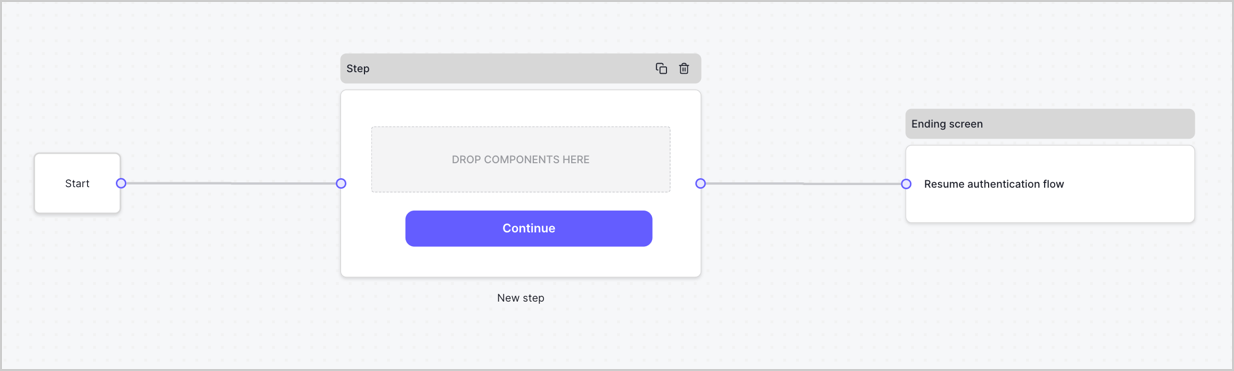
By default, a new form contains a Start node, a Step node, and an Ending screen node.
<Frame>
  <img src="https://mintcdn.com/docs-dev-chore-gt-workflow/wQ3pVPtF1h2WXvak/docs/images/cdy7uua7fh8z/2TZ9jSjgEcARFpULI6hz4R/a4319a1bd482f2ee5cc23100fdb2f42c/New-form-Forms-for-action-use-case.png?fit=max&auto=format&n=wQ3pVPtF1h2WXvak&q=85&s=42b15548f045d2033b2f1751fd65e863" alt="Dashboard > Forms > Use Cases > Form" data-og-width="1234" width="1234" data-og-height="371" height="371" data-path="docs/images/cdy7uua7fh8z/2TZ9jSjgEcARFpULI6hz4R/a4319a1bd482f2ee5cc23100fdb2f42c/New-form-Forms-for-action-use-case.png" data-optimize="true" data-opv="3" srcset="https://mintcdn.com/docs-dev-chore-gt-workflow/wQ3pVPtF1h2WXvak/docs/images/cdy7uua7fh8z/2TZ9jSjgEcARFpULI6hz4R/a4319a1bd482f2ee5cc23100fdb2f42c/New-form-Forms-for-action-use-case.png?w=280&fit=max&auto=format&n=wQ3pVPtF1h2WXvak&q=85&s=b5609b9c6a56bf9a7e7158e637013b9f 280w, https://mintcdn.com/docs-dev-chore-gt-workflow/wQ3pVPtF1h2WXvak/docs/images/cdy7uua7fh8z/2TZ9jSjgEcARFpULI6hz4R/a4319a1bd482f2ee5cc23100fdb2f42c/New-form-Forms-for-action-use-case.png?w=560&fit=max&auto=format&n=wQ3pVPtF1h2WXvak&q=85&s=6119345075b729a035bb90574ce0a51a 560w, https://mintcdn.com/docs-dev-chore-gt-workflow/wQ3pVPtF1h2WXvak/docs/images/cdy7uua7fh8z/2TZ9jSjgEcARFpULI6hz4R/a4319a1bd482f2ee5cc23100fdb2f42c/New-form-Forms-for-action-use-case.png?w=840&fit=max&auto=format&n=wQ3pVPtF1h2WXvak&q=85&s=7cdbfb4f7eac4d5bb697ba0183bd22f7 840w, https://mintcdn.com/docs-dev-chore-gt-workflow/wQ3pVPtF1h2WXvak/docs/images/cdy7uua7fh8z/2TZ9jSjgEcARFpULI6hz4R/a4319a1bd482f2ee5cc23100fdb2f42c/New-form-Forms-for-action-use-case.png?w=1100&fit=max&auto=format&n=wQ3pVPtF1h2WXvak&q=85&s=590572e5db62211c2bb68aba4d6a5714 1100w, https://mintcdn.com/docs-dev-chore-gt-workflow/wQ3pVPtF1h2WXvak/docs/images/cdy7uua7fh8z/2TZ9jSjgEcARFpULI6hz4R/a4319a1bd482f2ee5cc23100fdb2f42c/New-form-Forms-for-action-use-case.png?w=1650&fit=max&auto=format&n=wQ3pVPtF1h2WXvak&q=85&s=042e8707429b4ed6ef1514e5a7d54245 1650w, https://mintcdn.com/docs-dev-chore-gt-workflow/wQ3pVPtF1h2WXvak/docs/images/cdy7uua7fh8z/2TZ9jSjgEcARFpULI6hz4R/a4319a1bd482f2ee5cc23100fdb2f42c/New-form-Forms-for-action-use-case.png?w=2500&fit=max&auto=format&n=wQ3pVPtF1h2WXvak&q=85&s=b119ae61e5790366f55a704709c20b56 2500w" />
</Frame>

### Configure the Step node

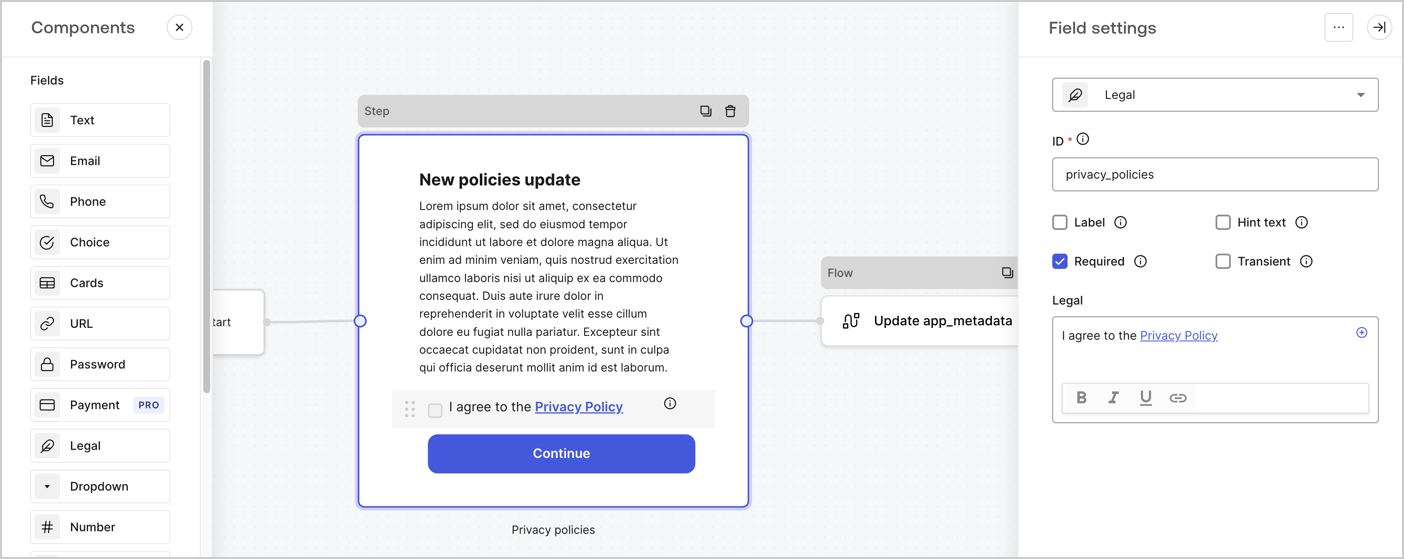
The Step node is the graphical interface visible to users. Add [Fields](/docs/customize/forms/nodes-and-components) to the Step node to collect the new agreement acceptance value by following these steps:

1. Drag a **Rich text** field from the **Components menu** into the **Step** node.

   * **Rich text**: Enter a description of your privacy policies updates.
   * Select **Save**.
2. Drag a **Legal** field into the **Step** node.

   * **ID**: Enter `privacy_policies`.
   * **Required**: Enable the checkbox.
   * **Legal**: Enter `I agree to the Privacy Policy`.
   * Select **Save**.
3. Select **Publish** to save.
<Frame>
  <img src="https://mintcdn.com/docs-dev-chore-gt-workflow/YR9zdE61d4kY3qbY/docs/images/cdy7uua7fh8z/59zFFjQjAnjogkc2QGIqqJ/0ad66b1b636544122aa4e65968b76c2c/privacy-policy-step-node.png?fit=max&auto=format&n=YR9zdE61d4kY3qbY&q=85&s=eaa5df9651e33f67d8a8ad332dc521c3" alt="Dashboard > Actions > Forms > Use case privacy policy step node" data-og-width="1404" width="1404" data-og-height="559" height="559" data-path="docs/images/cdy7uua7fh8z/59zFFjQjAnjogkc2QGIqqJ/0ad66b1b636544122aa4e65968b76c2c/privacy-policy-step-node.png" data-optimize="true" data-opv="3" srcset="https://mintcdn.com/docs-dev-chore-gt-workflow/YR9zdE61d4kY3qbY/docs/images/cdy7uua7fh8z/59zFFjQjAnjogkc2QGIqqJ/0ad66b1b636544122aa4e65968b76c2c/privacy-policy-step-node.png?w=280&fit=max&auto=format&n=YR9zdE61d4kY3qbY&q=85&s=1d39cd58d19f76bdf2e08f92a551c1d8 280w, https://mintcdn.com/docs-dev-chore-gt-workflow/YR9zdE61d4kY3qbY/docs/images/cdy7uua7fh8z/59zFFjQjAnjogkc2QGIqqJ/0ad66b1b636544122aa4e65968b76c2c/privacy-policy-step-node.png?w=560&fit=max&auto=format&n=YR9zdE61d4kY3qbY&q=85&s=0f61cf1f0f4d1b2eb19f8b24908c40f2 560w, https://mintcdn.com/docs-dev-chore-gt-workflow/YR9zdE61d4kY3qbY/docs/images/cdy7uua7fh8z/59zFFjQjAnjogkc2QGIqqJ/0ad66b1b636544122aa4e65968b76c2c/privacy-policy-step-node.png?w=840&fit=max&auto=format&n=YR9zdE61d4kY3qbY&q=85&s=d8981cffa9decc9a621c8a3240e70154 840w, https://mintcdn.com/docs-dev-chore-gt-workflow/YR9zdE61d4kY3qbY/docs/images/cdy7uua7fh8z/59zFFjQjAnjogkc2QGIqqJ/0ad66b1b636544122aa4e65968b76c2c/privacy-policy-step-node.png?w=1100&fit=max&auto=format&n=YR9zdE61d4kY3qbY&q=85&s=32078be7e1bcd85d4a22d9b40164500c 1100w, https://mintcdn.com/docs-dev-chore-gt-workflow/YR9zdE61d4kY3qbY/docs/images/cdy7uua7fh8z/59zFFjQjAnjogkc2QGIqqJ/0ad66b1b636544122aa4e65968b76c2c/privacy-policy-step-node.png?w=1650&fit=max&auto=format&n=YR9zdE61d4kY3qbY&q=85&s=1339755e5fbf5225e9d9fd5552fd12a5 1650w, https://mintcdn.com/docs-dev-chore-gt-workflow/YR9zdE61d4kY3qbY/docs/images/cdy7uua7fh8z/59zFFjQjAnjogkc2QGIqqJ/0ad66b1b636544122aa4e65968b76c2c/privacy-policy-step-node.png?w=2500&fit=max&auto=format&n=YR9zdE61d4kY3qbY&q=85&s=ceac25426a7ea9bf06158ac90cd683f6 2500w" />
</Frame>

### Configure the Flow node

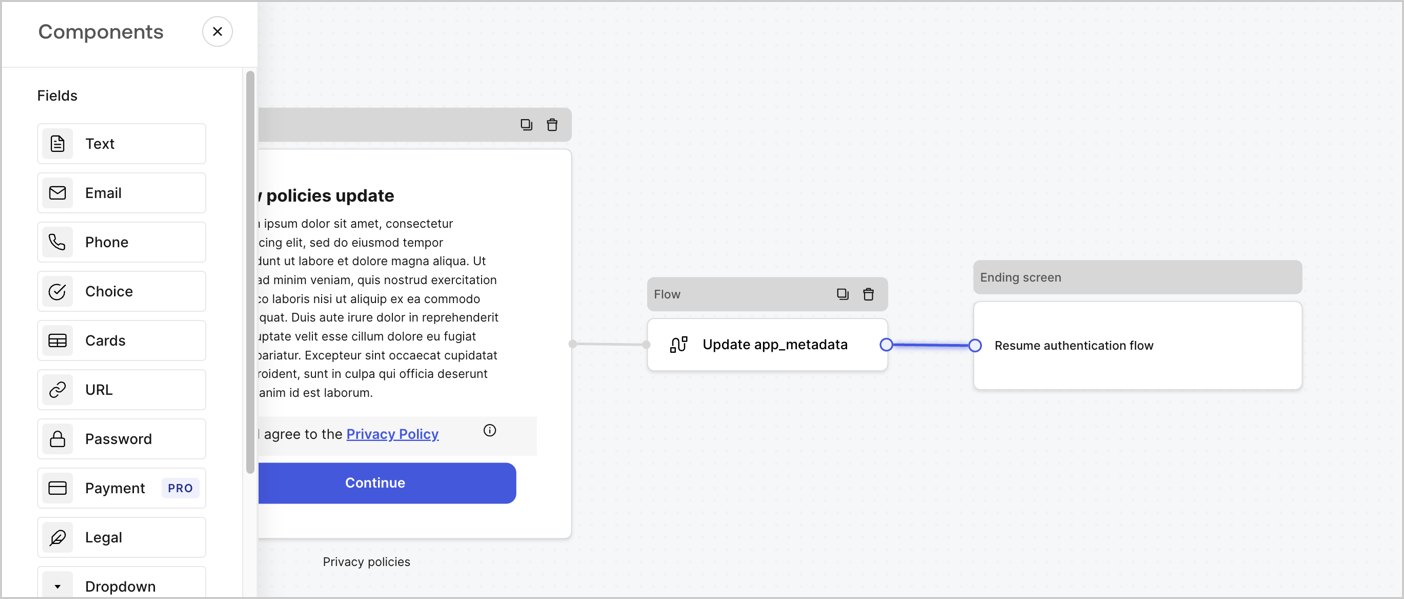
Add a **Flow** node after the **Step** node to update the `app_metadata` and resume the authentication flow by following these steps:

1. Select **Flow** from the bottom of the Form editor.
2. Remove the existing link between the **Step** and **Ending Screen** nodes.
3. Select the new **Flow** > **Click to add a flow** > **Create a new flow.**

   * Enter `Update app_metadata` in the **Name** field.
   * Select **Create**.
   * Select **Save**.
4. Link the **Flow** node to the **Step** and **Ending Screen** nodes as pictured below.
5. Select **Publish** to save.
<Frame>
  <img src="https://mintcdn.com/docs-dev-chore-gt-workflow/60TwJfqbbFwT_MMp/docs/images/cdy7uua7fh8z/6YIkzm7SrpM9LW76AXuRzh/353c518fe82bbaa440836da1d83596d6/link-policies.png?fit=max&auto=format&n=60TwJfqbbFwT_MMp&q=85&s=3e7ab3b9a13f7f74bf1a653ac8bb6b4c" alt="Dashboard > Actions > Forms > Form" data-og-width="1404" width="1404" data-og-height="599" height="599" data-path="docs/images/cdy7uua7fh8z/6YIkzm7SrpM9LW76AXuRzh/353c518fe82bbaa440836da1d83596d6/link-policies.png" data-optimize="true" data-opv="3" srcset="https://mintcdn.com/docs-dev-chore-gt-workflow/60TwJfqbbFwT_MMp/docs/images/cdy7uua7fh8z/6YIkzm7SrpM9LW76AXuRzh/353c518fe82bbaa440836da1d83596d6/link-policies.png?w=280&fit=max&auto=format&n=60TwJfqbbFwT_MMp&q=85&s=97883acec764efa2158587642b852a1a 280w, https://mintcdn.com/docs-dev-chore-gt-workflow/60TwJfqbbFwT_MMp/docs/images/cdy7uua7fh8z/6YIkzm7SrpM9LW76AXuRzh/353c518fe82bbaa440836da1d83596d6/link-policies.png?w=560&fit=max&auto=format&n=60TwJfqbbFwT_MMp&q=85&s=3bb29bb5532f3a5bfadeb70c7dcfca5c 560w, https://mintcdn.com/docs-dev-chore-gt-workflow/60TwJfqbbFwT_MMp/docs/images/cdy7uua7fh8z/6YIkzm7SrpM9LW76AXuRzh/353c518fe82bbaa440836da1d83596d6/link-policies.png?w=840&fit=max&auto=format&n=60TwJfqbbFwT_MMp&q=85&s=db975a4395af12925af0ed65788370cf 840w, https://mintcdn.com/docs-dev-chore-gt-workflow/60TwJfqbbFwT_MMp/docs/images/cdy7uua7fh8z/6YIkzm7SrpM9LW76AXuRzh/353c518fe82bbaa440836da1d83596d6/link-policies.png?w=1100&fit=max&auto=format&n=60TwJfqbbFwT_MMp&q=85&s=95590676b5798b0239bb4d9ddd32502a 1100w, https://mintcdn.com/docs-dev-chore-gt-workflow/60TwJfqbbFwT_MMp/docs/images/cdy7uua7fh8z/6YIkzm7SrpM9LW76AXuRzh/353c518fe82bbaa440836da1d83596d6/link-policies.png?w=1650&fit=max&auto=format&n=60TwJfqbbFwT_MMp&q=85&s=c2ebfaa96e370248c5b632cc79ae4420 1650w, https://mintcdn.com/docs-dev-chore-gt-workflow/60TwJfqbbFwT_MMp/docs/images/cdy7uua7fh8z/6YIkzm7SrpM9LW76AXuRzh/353c518fe82bbaa440836da1d83596d6/link-policies.png?w=2500&fit=max&auto=format&n=60TwJfqbbFwT_MMp&q=85&s=72fe903f3beeaf051dc175da985d404c 2500w" />
</Frame>

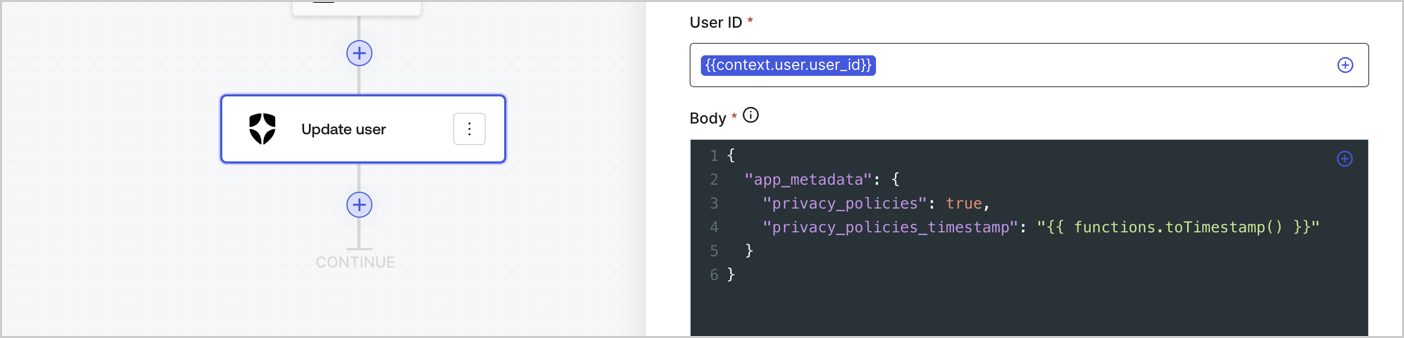
Add an Auth0 Update user action to the flow by following these steps:

1. Select the **Flow** **Update app\_metadata** > **Edit flow** to open the Flow editor in a new tab.
2. Below the StartAction, select the **+** icon to add an **Update user** action. Complete the fields below, then select **Save** to continue.

   * **Connection**: Select from the dropdown the Vault connection to your M2M application.

   * **User ID**: Enter `{{context.user.user_id}}`.

   * **Body**: Copy and paste the following code to update the app\_metadata with the privacy\_policies and privacy\_policies\_timestamp properties.

     ```text lines theme={null}
     {
       "app_metadata": {
         "privacy_policies": true,
         "privacy_policies_timestamp": "{{ functions.toTimestamp() }}"
       }
     }
     ```

   * Select **Save**.
3. Select **Publish** to save.
<Frame>
  <img src="https://mintcdn.com/docs-dev-chore-gt-workflow/bBUrkZHW0NTT3mho/docs/images/cdy7uua7fh8z/CvMNIwWrOUwaFW4X3G28p/1fb70ae57a20749d9ffaaba8dc0b7e26/update-user-privacy.png?fit=max&auto=format&n=bBUrkZHW0NTT3mho&q=85&s=65bb74488e2db96f38a582e8a7247e67" alt="Dashboard > Actions > Forms > User case privacy policy code" data-og-width="1404" width="1404" data-og-height="338" height="338" data-path="docs/images/cdy7uua7fh8z/CvMNIwWrOUwaFW4X3G28p/1fb70ae57a20749d9ffaaba8dc0b7e26/update-user-privacy.png" data-optimize="true" data-opv="3" srcset="https://mintcdn.com/docs-dev-chore-gt-workflow/bBUrkZHW0NTT3mho/docs/images/cdy7uua7fh8z/CvMNIwWrOUwaFW4X3G28p/1fb70ae57a20749d9ffaaba8dc0b7e26/update-user-privacy.png?w=280&fit=max&auto=format&n=bBUrkZHW0NTT3mho&q=85&s=5d06d637401a53b745bddd3784f05734 280w, https://mintcdn.com/docs-dev-chore-gt-workflow/bBUrkZHW0NTT3mho/docs/images/cdy7uua7fh8z/CvMNIwWrOUwaFW4X3G28p/1fb70ae57a20749d9ffaaba8dc0b7e26/update-user-privacy.png?w=560&fit=max&auto=format&n=bBUrkZHW0NTT3mho&q=85&s=f96669b6ee5355ced3b1ea8029955b13 560w, https://mintcdn.com/docs-dev-chore-gt-workflow/bBUrkZHW0NTT3mho/docs/images/cdy7uua7fh8z/CvMNIwWrOUwaFW4X3G28p/1fb70ae57a20749d9ffaaba8dc0b7e26/update-user-privacy.png?w=840&fit=max&auto=format&n=bBUrkZHW0NTT3mho&q=85&s=36c5fb4ec46f8486c2772850f4fc599f 840w, https://mintcdn.com/docs-dev-chore-gt-workflow/bBUrkZHW0NTT3mho/docs/images/cdy7uua7fh8z/CvMNIwWrOUwaFW4X3G28p/1fb70ae57a20749d9ffaaba8dc0b7e26/update-user-privacy.png?w=1100&fit=max&auto=format&n=bBUrkZHW0NTT3mho&q=85&s=cb492ac8f538a6089ab39999d2493a58 1100w, https://mintcdn.com/docs-dev-chore-gt-workflow/bBUrkZHW0NTT3mho/docs/images/cdy7uua7fh8z/CvMNIwWrOUwaFW4X3G28p/1fb70ae57a20749d9ffaaba8dc0b7e26/update-user-privacy.png?w=1650&fit=max&auto=format&n=bBUrkZHW0NTT3mho&q=85&s=dc664a37284396c22b6264807c972fd5 1650w, https://mintcdn.com/docs-dev-chore-gt-workflow/bBUrkZHW0NTT3mho/docs/images/cdy7uua7fh8z/CvMNIwWrOUwaFW4X3G28p/1fb70ae57a20749d9ffaaba8dc0b7e26/update-user-privacy.png?w=2500&fit=max&auto=format&n=bBUrkZHW0NTT3mho&q=85&s=1ea38a8abc73da738996705830582249 2500w" />
</Frame>

<Callout icon="file-lines" color="#0EA5E9" iconType="regular">
  The flow **Update app\_metadata** adds a `privacy_policies true` value to the app`_metadata` object and also generates a timestamp with a [helper function.](/docs/customize/forms/variables)
</Callout>

## Retrieve the form render code

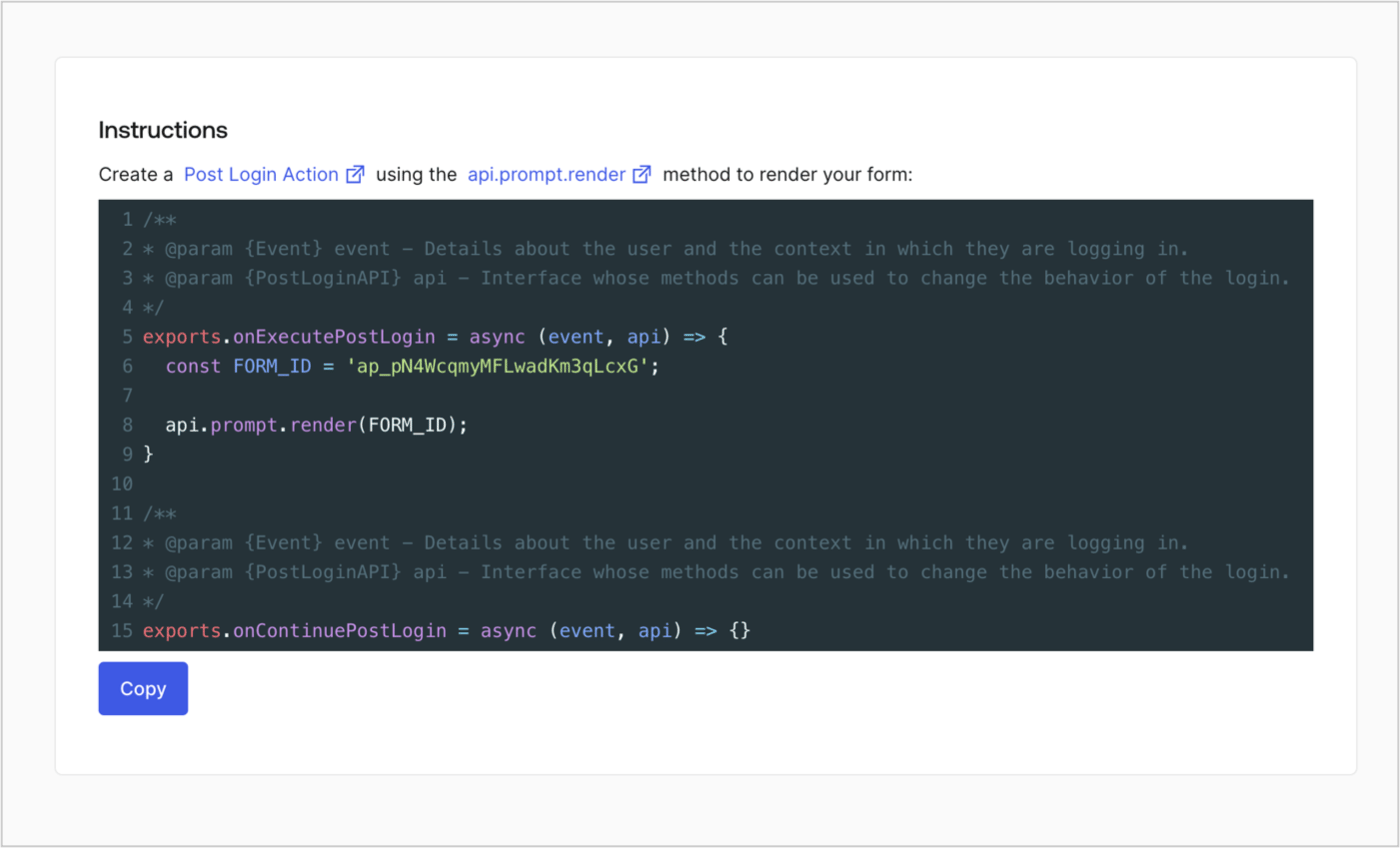
Retrieve your form render code to visually render the form with a custom Post Login Action by following these steps:

* From the Form editor, select **`<> Render`**.
* Select **Copy**.
<Frame>
  <img src="https://mintcdn.com/docs-dev-chore-gt-workflow/RFtYjLausKAJZRFt/docs/images/cdy7uua7fh8z/2EIUzc539sq9lwoTKbjoJv/496a864c0fc44a782c9cadca119dbfb0/embed.png?fit=max&auto=format&n=RFtYjLausKAJZRFt&q=85&s=9ccdf0dc660b8fc5935e8eb275603fbb" alt="Dashboard > Actions > Forms > Form > Embed" data-og-width="1400" width="1400" data-og-height="848" height="848" data-path="docs/images/cdy7uua7fh8z/2EIUzc539sq9lwoTKbjoJv/496a864c0fc44a782c9cadca119dbfb0/embed.png" data-optimize="true" data-opv="3" srcset="https://mintcdn.com/docs-dev-chore-gt-workflow/RFtYjLausKAJZRFt/docs/images/cdy7uua7fh8z/2EIUzc539sq9lwoTKbjoJv/496a864c0fc44a782c9cadca119dbfb0/embed.png?w=280&fit=max&auto=format&n=RFtYjLausKAJZRFt&q=85&s=1486406c105527f08d2fc660e5f60891 280w, https://mintcdn.com/docs-dev-chore-gt-workflow/RFtYjLausKAJZRFt/docs/images/cdy7uua7fh8z/2EIUzc539sq9lwoTKbjoJv/496a864c0fc44a782c9cadca119dbfb0/embed.png?w=560&fit=max&auto=format&n=RFtYjLausKAJZRFt&q=85&s=1a6d8bc670602f1abd8bcce8d4c28e97 560w, https://mintcdn.com/docs-dev-chore-gt-workflow/RFtYjLausKAJZRFt/docs/images/cdy7uua7fh8z/2EIUzc539sq9lwoTKbjoJv/496a864c0fc44a782c9cadca119dbfb0/embed.png?w=840&fit=max&auto=format&n=RFtYjLausKAJZRFt&q=85&s=e8a05d1df1f7383870d6cb04fa1a1f8a 840w, https://mintcdn.com/docs-dev-chore-gt-workflow/RFtYjLausKAJZRFt/docs/images/cdy7uua7fh8z/2EIUzc539sq9lwoTKbjoJv/496a864c0fc44a782c9cadca119dbfb0/embed.png?w=1100&fit=max&auto=format&n=RFtYjLausKAJZRFt&q=85&s=4ce477287497def9747fbaadd8a9a6e9 1100w, https://mintcdn.com/docs-dev-chore-gt-workflow/RFtYjLausKAJZRFt/docs/images/cdy7uua7fh8z/2EIUzc539sq9lwoTKbjoJv/496a864c0fc44a782c9cadca119dbfb0/embed.png?w=1650&fit=max&auto=format&n=RFtYjLausKAJZRFt&q=85&s=85f9af134e2401dad18d951f2a0b6b3c 1650w, https://mintcdn.com/docs-dev-chore-gt-workflow/RFtYjLausKAJZRFt/docs/images/cdy7uua7fh8z/2EIUzc539sq9lwoTKbjoJv/496a864c0fc44a782c9cadca119dbfb0/embed.png?w=2500&fit=max&auto=format&n=RFtYjLausKAJZRFt&q=85&s=2c20d6b32039a174d7c54dd63654cbe7 2500w" />
</Frame>

## Create a Post Login Action

Create a post-login Action to render your form by following these steps:

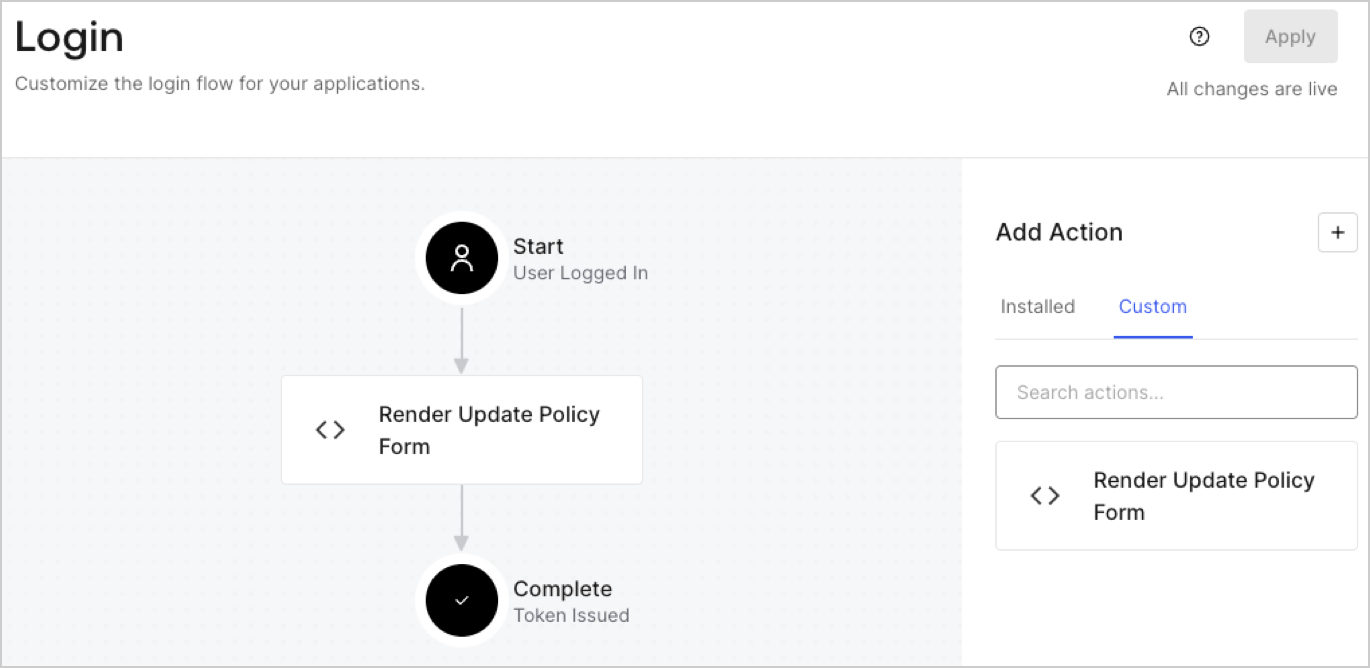
1. Navigate to **Auth0 Dashboard > Actions > Flows > Login.**
2. Select the **+** icon and Select **Build from scratch**:

   * **Name**: Enter `Render Update Policy Form`.
   * **Trigger**: Select `Login / Post Login`.
   * **Runtime**: Select the recommended version.
3. Select **Create**.

To configure the post-login Action:

1. Delete the existing code from the Code editor.
2. Paste the form render code into the Code editor.
3. Edit the code to define the conditional logic that will render the form.

   ```javascript lines theme={null}
   /**
   * @param {Event} event - Details about the user and the context in which they are logging in.
   * @param {PostLoginAPI} api - Interface whose methods can be used to change the behavior of the login.
   */
   exports.onExecutePostLogin = async (event, api) => {
     const FORM_ID = 'REPLACE_WITH_YOUR_FORM_ID';

     if (event.user.app_metadata.privacy_policies !== true) {
       api.prompt.render(FORM_ID);
     }
   }

   exports.onContinuePostLogin = async (event, api) => { }
   ```

   <Callout icon="file-lines" color="#0EA5E9" iconType="regular">
     The example code above will render the form when a user is missing the app metadata `privacy_policies` property.
   </Callout>
4. Select **Deploy.**
5. Drag and Drop the **Render Update Policy Form** Action to the **Login** flow.
   <Frame>
     <img src="https://mintcdn.com/docs-dev-chore-gt-workflow/GPaOIeB7LwfCtBaZ/docs/images/cdy7uua7fh8z/5TOwDgevZsBqd7yZynUYWU/41ca909dc3007aed4f40ff794a05efa5/postlogin.png?fit=max&auto=format&n=GPaOIeB7LwfCtBaZ&q=85&s=8cc7f406c1fb23e881bcc64ff92b14b6" alt="Dashboard > Forms > Use Case > Render update policy form login action" data-og-width="1370" width="1370" data-og-height="668" height="668" data-path="docs/images/cdy7uua7fh8z/5TOwDgevZsBqd7yZynUYWU/41ca909dc3007aed4f40ff794a05efa5/postlogin.png" data-optimize="true" data-opv="3" srcset="https://mintcdn.com/docs-dev-chore-gt-workflow/GPaOIeB7LwfCtBaZ/docs/images/cdy7uua7fh8z/5TOwDgevZsBqd7yZynUYWU/41ca909dc3007aed4f40ff794a05efa5/postlogin.png?w=280&fit=max&auto=format&n=GPaOIeB7LwfCtBaZ&q=85&s=7b52d6e8e46a812dd7b4eea0cfb57970 280w, https://mintcdn.com/docs-dev-chore-gt-workflow/GPaOIeB7LwfCtBaZ/docs/images/cdy7uua7fh8z/5TOwDgevZsBqd7yZynUYWU/41ca909dc3007aed4f40ff794a05efa5/postlogin.png?w=560&fit=max&auto=format&n=GPaOIeB7LwfCtBaZ&q=85&s=cbbc67aeb69e234b869443125a4d4f4d 560w, https://mintcdn.com/docs-dev-chore-gt-workflow/GPaOIeB7LwfCtBaZ/docs/images/cdy7uua7fh8z/5TOwDgevZsBqd7yZynUYWU/41ca909dc3007aed4f40ff794a05efa5/postlogin.png?w=840&fit=max&auto=format&n=GPaOIeB7LwfCtBaZ&q=85&s=f51a200e04a7147f550fdc8721de8bd5 840w, https://mintcdn.com/docs-dev-chore-gt-workflow/GPaOIeB7LwfCtBaZ/docs/images/cdy7uua7fh8z/5TOwDgevZsBqd7yZynUYWU/41ca909dc3007aed4f40ff794a05efa5/postlogin.png?w=1100&fit=max&auto=format&n=GPaOIeB7LwfCtBaZ&q=85&s=e71670a253faa3038bdb96ed07a40fc0 1100w, https://mintcdn.com/docs-dev-chore-gt-workflow/GPaOIeB7LwfCtBaZ/docs/images/cdy7uua7fh8z/5TOwDgevZsBqd7yZynUYWU/41ca909dc3007aed4f40ff794a05efa5/postlogin.png?w=1650&fit=max&auto=format&n=GPaOIeB7LwfCtBaZ&q=85&s=66a5fdfadd7481aa77e271f6beceb085 1650w, https://mintcdn.com/docs-dev-chore-gt-workflow/GPaOIeB7LwfCtBaZ/docs/images/cdy7uua7fh8z/5TOwDgevZsBqd7yZynUYWU/41ca909dc3007aed4f40ff794a05efa5/postlogin.png?w=2500&fit=max&auto=format&n=GPaOIeB7LwfCtBaZ&q=85&s=46b1ffa4f7dc7a71a97e8974591a9337 2500w" />
   </Frame>
6. Select **Apply.**

### Test implementation

Test the implementation by following these steps:

1. Log in with an existing user whose app`_metadata` attribute `privacy_policies` does not have a value.
2. The post-login Action in the Login flow will render the form and prompt for acceptance.
3. Select **Auth0 Dashboard > User Management > Users,** locate the user and verify that the `app_metadata` attribute `privacy_policies` contains a `true` value and a timestamp.
